Ask any small business owner what they’d happily never do again, and data entry will be near the top of the list. Copying invoice totals into a spreadsheet. Re-entering customer details into a CRM. Filling the same supplier portal form for the fifth time this month. It’s slow, it’s dull, and it’s where expensive little mistakes hide.
Big companies throw robotic process automation platforms at this problem. Most small businesses don’t need that. With a few inexpensive tools and better habits, you can remove a large share of manual typing and catch errors before they cost you.
The Scale of the Small Business Data Entry Problem
There are 36,207,130 small businesses in the United States, making up 99.9% of all firms and employing 62.3 million people, or 45.9% of private sector workers (SBA Office of Advocacy, 2026). Most of them don’t have an IT department, and many run on spreadsheets, email, and a handful of web portals.
Surveys consistently show how much time repetitive work eats. Zapier’s research on small and midsize businesses found 94% of knowledge workers perform repetitive, time-consuming tasks, and 38% named data entry among their most time-consuming (Zapier, 2021). An Automation Anywhere survey of more than 10,000 office workers found they averaged over three hours a day on manual, repetitive computer tasks, and data entry was voted the most hated office task (2020). Both surveys are a few years old, but the pattern hasn’t gone away.
The job market tells the same story from another angle. The Bureau of Labor Statistics projects data entry keyer jobs will fall from 131,800 in 2025 to 98,200 in 2035, a 25.5% decline and one of the steepest drops of any occupation (BLS, 2025 to 2035 projections). Automation is absorbing the work.
How Often Manual Entry Goes Wrong
You’ll often see a “1% to 4% error rate” quoted online. That figure mostly circulates through vendor blogs without a clear primary source. The better data comes from research.
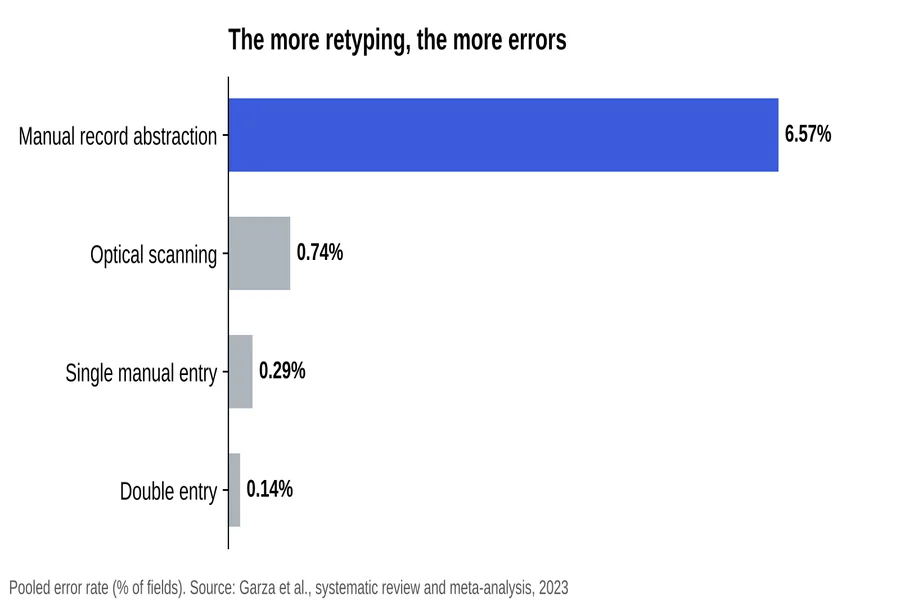
A 2023 systematic review and meta-analysis by Garza and colleagues pooled error rates across data collection methods. Single manual entry averaged 0.29% of fields. Double entry, where two people or two passes enter the same data and mismatches get flagged, cut that to 0.14%. Manual abstraction from records, where someone reads a source and types out what they find, was far worse at 6.57%.
Pooled error rates by data processing method. Source: Garza et al., systematic review and meta-analysis, 2023 (preprint).
The study came from clinical research data, so treat the exact numbers as a guide rather than a small business benchmark. But the lesson carries over. The more a person has to read, interpret, and retype, the more errors creep in.
Another study makes the same point sharply. Barchard and Pace found visual checking, just looking over entered data, produced 2,958% more errors than double entry, and wasn’t significantly better than no checking at all (Computers in Human Behavior, 2011).
Five Practical Ways to Reduce Manual Entry
Capture Data Once, at the Source
The best data entry is the kind nobody does. Use web forms that feed directly into your spreadsheet or CRM instead of paper forms someone types up later. Google Forms, Typeform, and most CRMs offer this for free or close to it.
Connect Your Apps
If an order in your shop platform has to be retyped into your accounting software, that’s a connection waiting to happen. Zapier, Make, and native integrations can pass data between apps automatically. Even one connection can remove hours a month.
Use Templates and Text Shortcuts
For text that repeats, like standard replies, product descriptions, and terms, set up templates or a text expander. Smartsheet’s research found 59% of workers believed they could save six or more hours a week if repetitive tasks were automated (Smartsheet, 2017).
Automate the Typing That Has to Happen
Some entry can’t be connected. A supplier portal with no integration. A government form that blocks pasting. A legacy system that only accepts keyboard input. For these, an auto typer can do the keyboard work for you.
Phrasly’s human auto typer is a Chrome extension that types prepared text into web forms and online text fields, character by character, at a speed you choose between 30 and 240 WPM. You prepare the content once, paste it into the extension, and let it type into the field. It’s especially useful for long text fields, like product descriptions or detailed notes, in portals that reject or garble pasted content.
Verify With Double Entry or Automated Checks
For data that really matters, like invoices, payroll, and tax figures, use double entry or automated validation rules instead of eyeballing. The research is clear that visual checking alone barely helps.
Signs Your Business Has Outgrown Manual Entry
Not every business needs to automate right away. These are the usual warning signs that it’s time:
- The same customer or order details live in three or more places
- Month-end reconciliation takes days instead of hours
- Errors are found by customers or suppliers before you catch them
- A key person going on holiday means certain records stop being updated
- Staff are hired mainly to type information from one system into another
If two or more of these sound familiar, the time you’d save almost certainly outweighs the cost of a few modest tools.
Choosing Tools on a Small Business Budget
Start with what you already pay for
Your accounting software, CRM, and online store likely include import tools, built-in forms, and native integrations you haven’t switched on. Check the settings and app marketplace before buying anything new.
Prefer tools your team will actually use
A simple spreadsheet template that everyone follows beats a sophisticated system that only one person understands. Adoption matters more than features.
Watch for per-task pricing
Integration platforms often charge by the number of automated actions. Estimate your monthly volume first so the bill doesn’t surprise you as the business grows.
Keep a manual fallback
Automations break when an app updates or a password changes. Document the manual process so work can continue while you fix the connection.
Protect customer data along the way
Every new tool that touches customer names, addresses, or payment details is another place that information lives. Check where each tool stores data, turn on two-factor authentication, and remove access for anyone who no longer needs it. Saving time shouldn’t come at the cost of a privacy problem.
Where to Start This Week
Don’t try to automate everything at once. Pick the one task that costs you the most time or causes the most errors.
- List every place data gets typed more than once in your business
- Rank them by hours spent per month
- Fix the top item with the simplest tool that works
- Measure the time saved after a month, then move to the next item
UiPath’s 2024 research found 55% of workers who combine generative AI with automation save 10 or more hours a week, versus 31% using generative AI alone. The combination matters. AI can draft or extract, and automation moves the result where it needs to go.
A Quick Example
Picture a three-person online shop that lists 40 new products a month across its own site and two marketplaces. Each description gets written once, then typed or pasted into three separate seller dashboards, one of which strips formatting. A shared spreadsheet as the single source, a marketplace integration for the platform that supports one, and an auto typer for the dashboard that doesn’t can cut that triple handling down to a single write. No new staff, no enterprise contract.
Keep Humans Where Judgment Matters
Automation handles repetition. It shouldn’t handle decisions. Keep a person reviewing anything unusual: a vendor’s new bank details, a sudden spike in an order, an invoice that doesn’t match the purchase order. That’s where fraud and costly errors usually show up.
For more guides on practical writing and productivity tools, visit the Phrasly blog.
Start With Your Biggest Time Sink
Manual data entry costs small businesses time, patience, and accuracy, and research shows that retyping and visual checking are exactly where errors multiply. You don’t need enterprise software to fix it. Capture data once, connect the apps you already use, lean on templates, let an auto typer handle stubborn web forms, and verify important figures properly. Start with your single biggest time sink this week. The hours you recover add up faster than you’d expect.